Client work · anonymized · 2026
Field Operations Platform
A field operations system for a roofing company — built for roofs with no signal, then broken by them. Every failure it hit became a rule a machine now re-checks.
- Role
- Product design, field UX, full-stack development
- PWA
- JavaScript
- Service Worker
- Supabase
- PostgreSQL
- RLS
- GPS
- Python
- FastAPI
- Claude
- Gmail
- Microsoft Graph
- Result
- 69 invariant tests, each one born from a production bug. The office sees the job the same day instead of three days later.
Stack
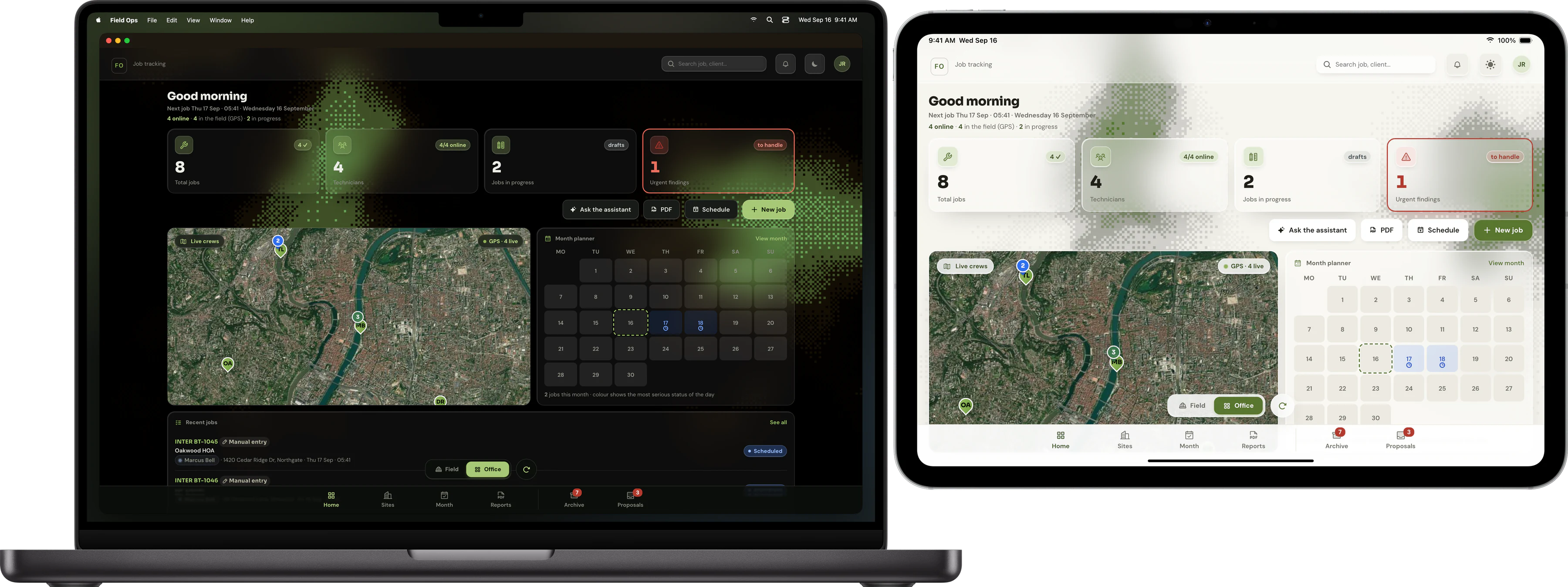
The job, before any of this existed
A roofer climbs onto a roof, opens a paper sheet, and writes down what he finds: the state of the ridge, the verges, the covering, the flashing, every pipe and vent coming through. He photographs what matters. He comes down. Three days later, somebody at the office types the sheet into a computer, calls him to ask what a word meant, and turns it into a report the client will read.
That is the whole problem, and it is not a data-entry problem. The information is born in the one place where there is no network, by someone wearing gloves, on a screen he cannot read in full sun, and it has to survive the trip back intact — because at the end of it a client receives a document, and that document has to say what the roofer actually saw.
A plain CRUD app does not survive that trip. It assumes the network is there when you press save, that nobody else is editing the same record, and that a green response means the data landed. On a roof, all three assumptions are false.
The four conditions that shaped everything
These are not all the constraints. They are the ones that each forced a structural decision — the rest were details.
Constraint → decision
What the field imposes
- No signal is the normal case, not the exception — cellars, roofs, rural sites
- Hardened Android phones several years old, whose own camera app often refuses to open from a browser
- Two people editing the same job at once: the technician offline on the roof, the office live at a desk
- The output is a document a client reads — what goes in has to come out
What it forces the architecture to be
- Every write lands on the phone first and joins a queue; the network is never on the critical path
- The camera lives inside the app, through the browser, never delegated to the phone
- Merge field by field, with a written rule for who wins — and a conflict that is never silent
- A test that checks the shape of the output is not enough: it has to check the input comes back out
How it all fits together
The four parts, and the rule that governs each crossing
The field
- The technician’s phone
- Survey, photos, sketch, position
- Works in airplane mode
Nothing leaves without going through the local queue
The data
- One database per company, isolated row by row
- Photos in private storage
- Merging happens field by field
The office reads the same row, live
The office
- Crew map, counters, planner
- Directory of sites and managing agents
- The client report as a PDF
The agent proposes, it never writes
Automation
- Two mailboxes re-read every minute
- Quotes, invoices, complaints extracted from PDFs
- Everything lands in a proposal queue
How a finding travels
From the roof to the client's report
- 01 On the roof The technician fills in, photographs, confirms. Fifteen steps at most, only the ones that apply to this job type.
- 02 Written on the phone Immediately — the record in local storage, the photos in a local database of their own.
- 03 The queue The change waits its turn, with a revision number that changes at every edit.
- 04 The signal returns The queue replays in order. Before each write it re-reads the server row and merges field by field.
- 05 The office Live map, counters for the day, month planner — and the client report as a PDF, in one gesture.
Alongside it, an agent watches two mailboxes: signed quotes, invoices and complaints used to be re-typed by hand into the client records. It reads them, opens the PDFs, extracts the figures — and stops. It never writes into the live database. Everything it produces lands in a queue where a person re-reads it and clicks.
Signed quote — Oakwood HOA
- Client
- Oakwood HOA ▾
- Quote no.
- DV 2845
- Amount
- $5,078.50 excl. tax
- Address
- 1420 Cedar Ridge Dr, Austin
- ZIP
- 78701
- Unit
- APT 42
- Text to copy
- DV 2845 - OAK / BC-883603
Where it broke
The interesting part of this project is not that it was built. It is that it went into the hands of people on roofs, broke in ways the design had not imagined, and that each break left a rule behind. What follows is not a bug list — these four are the ones that changed how the system is built.
1 — “I came back and everything had gone”
A technician lost a report he had already filled in
Reported from a site, July
- The assumption
- The draft was saved at every keystroke and at every photo. So the work was safe: coming back to the app would obviously bring it back.
- What happened
- He left the app during a report. On his return he was on the home screen, at the beginning, and the photos of the draft were gone too.
- Why
- Five faults, none of them individually unacceptable, chained: a cache serving an older version, photo storage that had become private, a race between two operations, expired image addresses, and a fragile sync. The draft did exist — but reopening it required tapping a button he never saw, and the photo was still being written to the local database when he closed the app.
- What changed
- Reopening the app on an active draft now reopens the report at the saved step, no button to find. The photo is written to local storage and awaited before the draft that references it is saved. And the draft is saved on the way out of the app, not only on the way in.
- The proof
- The chain is now covered by invariant tests that read the source itself, and the deployed version is checked by fetching the live service worker rather than trusting the deploy.
2 — Every photo, gone at once, for everyone
All the photos disappeared, and nothing was lost
Reported as “no photos on one job”, July
- The assumption
- Photo storage is private, so the app signs temporary addresses to display them — and a public address was kept alongside as a fallback, just in case.
- What happened
- Every photo vanished at once, for every user. Not one job: all of them, with no error on screen.
- Why
- On private storage a public address answers with an error — the fallback was dead, and had been from the start. All the addresses were signed in a single grouped call whose failure was being swallowed. One transient hiccup was therefore enough to empty the entire display, with no recourse — while every file and every row sat intact.
- What changed
- Valid signed addresses are kept so they survive a reload, the display is rebuilt from them at start-up, and signing happens in small isolated batches: a batch that fails now deprives only itself.
- The proof
- A three-layer diagnostic, written down and repeatable: does the row exist, does the file exist, does the signature work. If all three answer yes, nothing is lost — and the answer is in the display, not the data.
3 — The queue that quietly ate what you typed
A write made during a sync disappeared without trace
Found by an adversarial audit, July
- The assumption
- Send the queued records one by one, then write back what is left. Straightforward, and it had worked for months.
- What happened
- Anything typed while a sync was running could vanish. The server held one version, the screen showed another, and no retry existed any more.
- Why
- Reading the queue, sending over the network and writing the queue back are not one instant — the network sits in the middle. Writing back the remainder overwrites a queue that has moved on since. Worse: the obvious way to detect it, the existing timestamp, was deliberately kept unchanged on re-queue so that conflicts could be detected. It could not see a content change.
- What changed
- The flush no longer overwrites — it reconciles. Every entry carries a revision counter that changes at every single edit; at acknowledgement the queue is re-read and an outcome is applied only if the revision still matches. Anything queued during the flush is preserved untouched.
- The proof
- The merge rule lives between two markers in the source, and a script tests exactly that region — so moving the code without moving the test is caught.
4 — A green answer that did nothing
A button that answered “done” for weeks, and deleted nothing
Found by writing a test against the real database
- The assumption
- The database enforces per-company isolation, row by row. The rules were written and reviewed, so they were in force.
- What happened
- A reset button reported success every time and removed nothing. For weeks. Nobody noticed, because nothing failed.
- Why
- When a delete has no matching security policy, the database does not refuse — it answers “no content, all good” and removes zero rows. Success and “silently forbidden” look identical from the outside.
- What changed
- Isolation is no longer verified by reading the rules. A check signs in as a real technician account against the real database, creates a throwaway record, and asserts what that account can and cannot reach.
- The proof
- The check runs with the rights of a technician, never an owner, and would go red on a missing policy — which is exactly the case it was written to catch.
What “it works” means here
The rule the test file states about itself
What the invariants are for
- Every production bug found by hand earns an invariant here, so it never comes back
- 69 of them today — none of them tests a crash
- They test contradictions: two places in the code that must agree, and stopped agreeing
- They read the shipped source itself, not a copy that can drift
What the tests before them could not see
- They only covered boot, the service worker and offline mode
- They let a total blockage at step 5 through for weeks
- They let a survey that never left the phone through for weeks
- Nothing crashed — a well-formed output was checked, never that the input came back out
Three habits came out of those four incidents, and they now apply to everything added to the system.
- A control that cannot go red proves nothing. When a guard is written, it gets deliberately broken to check it reacts — the second leak found in the demo dataset was closed with four sensors, each sabotaged and kept.
- Green tests are not proof the data survived. Checking that an output is well formed is not checking that what was typed in comes back out; that single missing check, added once, brought down five live defects in one pass.
- Look upstream before blaming the code. A wave of duplicate jobs looked like broken deduplication. Measured: zero duplicate identifiers across 55, zero same client on the same day, zero shared identifier across 181 calendar events. The duplicates came from people deleting and re-creating appointments in their calendar, which hands out a fresh identifier every time. The fix belonged upstream, not in the merge.
What the agent is allowed to do
The boundary, spelled out
What the agent does on its own
- Read two mailboxes, every minute, and classify every message
- Open PDF attachments and extract client, references, amounts, dates
- Query the client's database — read-only
- Draft a reply, left unsent
What it is not allowed to do
- Write into the client's live database
- Send an email on their behalf
- Create a record nobody has re-read
- Delete or overwrite existing data
That boundary is not caution for its own sake. An earlier version of this pipeline re-created every proposal it had already handled, because its only real guard against double-processing was whether an email still looked unread — an external flag that can reset itself, and whose update could fail in silence. The lasting fix was a durable registry of what has been processed, written on every success and read before every run.
Operations
- Per-company isolation at the database level, designed in from the start rather than bolted on later — and verified against the real database, not against the rules on paper.
- Encrypted off-machine backups, with restoration verified byte for byte.
- Installable from the browser, with no app store in the way.
- Keyboard operable, contrast meeting the AA threshold — an app that has to be read in full sunlight.